As we continue to expand intelligence capabilities in Red Hat Ansible Automation Platform, we’ve made the MCP server available as a technology preview feature in Ansible Automation Platform 2.6.4. The MCP server acts as a bridge between your MCP client of choice and Ansible Automation Platform. This integration helps you manage your entire infrastructure estate with exciting new tools like Cursor and Claude.
What is MCP server for Ansible Automation Platform?
The MCP server for Ansible Automation Platform is a Model Context Protocol (MCP) server implementation that enables Large Language Models (LLMs) to interact with and manage Ansible Automation Platform through natural language interactions. This reduces the complexity of automation operations and enhances how teams work with infrastructure automation, all while maintaining enterprise-grade security and governance. In short, it provides a conversational interface to your automation estate and allows you to trigger and query your existing Ansible automation through simple dialogue without bypassing established controls.
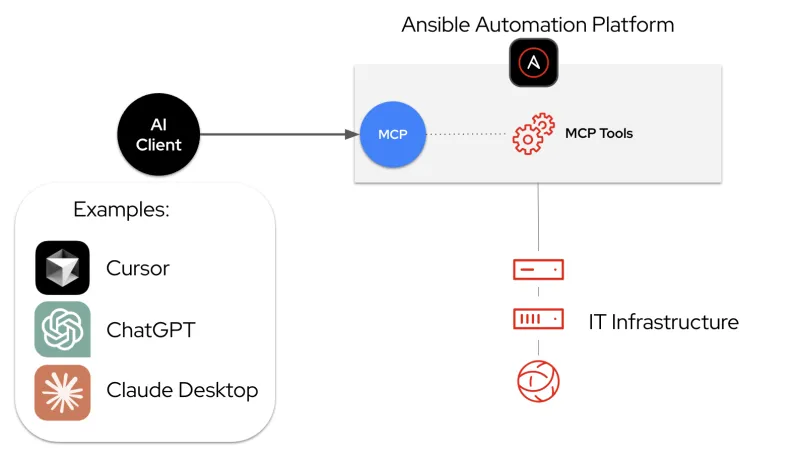
How it works and why it matters
With the addition of the MCP server, your AI tools and LLMs of choice can now talk directly to Ansible Automation Platform, helping users navigate, query, and understand automation environments, as well as orchestrate automation workflows through natural language.
The MCP server is deployed within Ansible Automation Platform. It is installed as part of the standard Ansible Automation Platform installation process and provides a comprehensive toolset for capabilities, such as job management, inventory management, and security compliance. Once deployed, administrators have the flexibility to configure the MCP server in 1 of 2 modes: read-only mode, which is ideal for safe querying and monitoring, or read-write mode, which allows AI agents to execute jobs and implement changes.
It is important to enable AI accessibility without compromising security. This is done by providing secure, role-based access to jobs, content, monitoring, and administrative functions. The MCP server enforces a dual-layer security model that combines server-level and user-level permissions. By connecting directly to Ansible Automation Platform APIs, it inherits user permissions via role-based access control (RBAC) and governance policies. This structure helps guarantee that the AI agent can only execute actions permitted by both the server configuration and the user's defined permissions.
A natural language interface simplifies IT automation by allowing users to execute tasks through conversational descriptions. This chat-based approach makes creating automation less complex, benefiting both seasoned engineers and new users.
The following demo showcases these benefits across 5 real-world scenarios ranging from zero-touch deployments to intelligent troubleshooting, demonstrating how the MCP server maintains strict security and governance while making automation more accessible through natural language.
Getting started
Ready to explore AI-powered automation? The MCP server for Ansible Automation Platform is available as a technology preview feature in Ansible Automation Platform 2.6.4.
Installation options
The MCP server can be deployed on 2 types of Ansible Automation Platform installations:
- For deployments on Red Hat Enterprise Linux (RHEL) 9 or 10, you can deploy the MCP server through the containerized installer. The server runs as a pod alongside your Ansible Automation Platform components and is exposed on port 8448 with HTTPS-enabled.
- For deployments on Red Hat OpenShift Container Platform (versions 4.12 through 4.17 and later), you can deploy the MCP server through the Ansible Automation Platform operator. The operator handles the lifecycle management and creates the necessary OpenShift routes automatically.
Official documentation
The documentation includes instructions on how to install, how to configure server-level and user-level permissions, and how to connect external AI agents (e.g., Claude, Cursor, ChatGPT, VS Code). Users can provide feedback and issues through this form.
- For installing on RHEL: Deploying Ansible MCP Server - Containerized Installation
- For installing on Red Hat OpenShift: Deploying Ansible MCP Server - OpenShift Container Platform
Available toolsets
The MCP server currently provides 6 specialized toolsets, each designed to support different roles and use cases:
Job management | Tools to list available job templates, launch automation jobs, and monitor their real-time status. |
Inventory management | Tools to query your inventory for host details, check group membership, and verify system facts. |
System monitoring | Tools to retrieve job logs, troubleshoot failed tasks, and check the health of your automation environment. |
User management | Tools to allow the AI agent to administer access and organizational structure within Ansible Automation Platform. |
Security and compliance | Tools that enable the AI agent to act as a security operator, managing sensitive credentials and verifying platform integrity without exposing raw secrets. |
Platform configuration | Tools that enable administrators and developers to inspect and tune Ansible Automation Platform infrastructure itself. |
Next steps
The MCP server for Red Hat Ansible Automation Platform is key to our ongoing strategy of using AI integration to make enterprise automation more accessible and powerful. By integrating the security-focused, robust features of Ansible Automation Platform with the natural, conversational power of agentic AI, we’re unlocking new possibilities for IT collaboration, automation, and innovation.
We can’t wait to see the incredible things you’ll build with this technology! This is just the beginning, and since it’s in technology preview, your hands-on experience is exactly what we need to shape its future.
Ready to dive in?
- Explore: Download it and try it in your own environment today.
- Collaborate: Spotted a bug or have a "what if" feature idea?
- Connect: Go to this form to share your feedback.
저자 소개

Marty is a product manager at Red Hat, focused on bringing AI to IT automation. Since joining the Ansible Business Unit in 2023, he's worked on some exciting projects, starting with Ansible Lightspeed, then the MCP server, and now deep diving into AIOps for Ansible Automation Platform.
He's been in tech for a long time, and is based in the Raleigh area where he heads to the office pretty much every day. When working on projects, he likes to experiment with vibe coding. And outside of work, you'll find him gaming on the PS5 or practicing the piano. Turns out it's never too late to learn an instrument!
유사한 검색 결과
AI insights with actionable automation accelerate the journey to autonomous networks
How Banco do Brasil uses hyperautomation and platform engineering to drive efficiency
Technically Speaking | Taming AI agents with observability
You Can't Automate Buy-In | Code Comments
자세히 알아보기
- E-book: 기업 자동화
- 체험: 자기 주도식 핸즈온 랩으로 구성된 Red Hat Ansible Automation Platform
- Red Hat Ansible Automation Platform: 초보자 가이드
채널별 검색

오토메이션
기술, 팀, 인프라를 위한 IT 자동화 최신 동향

인공지능
고객이 어디서나 AI 워크로드를 실행할 수 있도록 지원하는 플랫폼 업데이트

오픈 하이브리드 클라우드
하이브리드 클라우드로 더욱 유연한 미래를 구축하는 방법을 알아보세요

보안
환경과 기술 전반에 걸쳐 리스크를 감소하는 방법에 대한 최신 정보

엣지 컴퓨팅
엣지에서의 운영을 단순화하는 플랫폼 업데이트

인프라
세계적으로 인정받은 기업용 Linux 플랫폼에 대한 최신 정보

애플리케이션
복잡한 애플리케이션에 대한 솔루션 더 보기

가상화
온프레미스와 클라우드 환경에서 워크로드를 유연하게 운영하기 위한 엔터프라이즈 가상화의 미래
